Printing Pics
Jan. 22nd, 2010 03:11 pm![[personal profile]](https://www.dreamwidth.org/img/silk/identity/user.png) unforth
unforthAs I mentioned in yesterdays post, I went ahead and picked 60 of the pictures from this post to print at Walgreens.
I'm really, really glad I did this, because I've learned some valuable things about how this process is going to work. See, some pics I thought would look fantastic printed, just don't, and others that were very problematic on a computer screen actually turned out. In short, the pattern I noticed in this was:
1. Bright colors weren't as bright, so that the pics that really depended on brights just didn't have the pop.
2. Dark colors weren't as dark, so that the pics that I was worried would be very dark actually showed a lot of detail that wasn't visible on my computer screen (which makes me think it's time to change my screen settings...)
3. Fuzzy things looked fuzzier.
4. Things that looked like they were evenly shaded showed much more variation of color.
5. Shots that were suffused with sunlight got over-suffused with sunlight.
So I thought I'd go pic by pic on this, if only for my own information...and, of course, keep in mind that in comparison of the prints to the originals, I can only speak for how they look on the settings on my computer screens.
Note that, even though I uploaded the pics in basically the order listed here, they didn't print in that order at all, and I wrote my comments in the order the pics were in the file, so I suspect that some of my later comments are on "earlier" pictures...but it can't be helped. I tried to keep them relatively neutral in that regard, but didn't always succeed... :)
1. Thames Sunset:

I didn't think I'd printed this one, but it turns out that I did. The printed version looks a bit warmer, and the colors pop a bit better. Still, I think some of the manips would have printed better, and I didn't bother trying yet, cause I'm not quite there yet.
2. Graffiti:

I think this may be one of the only shots that printed looking pretty much exactly the way it does on the screen. :)
3. Big Ben and Parliament:
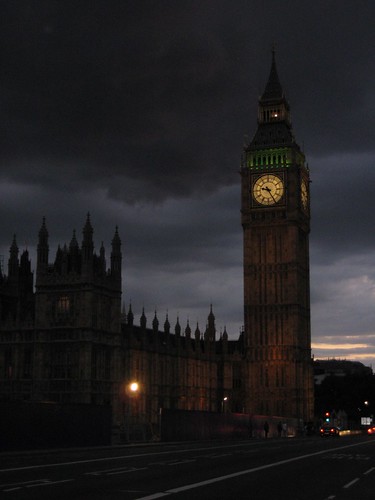
This pic has a big pro and a big con. On the pro side, it printed considerably lighter than it appears on my computer screen, the contrast looks great, the shades on the clock tower look awesome, and in that regard I'm happy. On the con, there's something kinda fuzzy about the whole thing, particularly the building itself in the left foreground. Still, I think I'd print again. Now if I only I could get Big Ben to pop like it does in the printed version while still maintaining the appearance of that awesome looming sky (which lightened also, unfortunately)
4. Sunset Over the River:

I was warned that some of the warm tones in pictures like this might not print that well, and that's basically what happened. The sky printed a lighter, and though the pinks and oranges are still definitely present, it lacks a certain pop. It's not as bad as some of the ones that really didn't work, but I'm not in love with it either. It's just...not that interesting.
5. Architecture Along the Thames:

Of the shots I printed, I think this one was the most pleasant surprise. It printed with much better contrast than on my screen, a lot of details that were indistinguishable are now visible, and I think it looks really great, especially the reflections on the windows.
6. Angel Over Prague:

On my screen, the angel is a dark blob. On the print, all the highlights of the hair and the face are actually visible, and I think that's a good thing. Some of the other colors washed out a little, which is a pity, but over all I think that it printed in a distinctly different but still really awesome way. :)
7. T.C. Masaryka Statue:

Printed pretty much exactly how it looks on the screen. Not sure that makes it worth printing - this is a shot I'm very much on the fence about - but whatever. :) That's a different question.
8. Statue Outside the Main Courtyard: (didn't print)
9. Tunnel:

This printed very nice. The contrast stayed very nice, and the lights look nice.
10. Demon Face:

Printed with better contrast. The stone wall reads really light on the print out.
11. Snow Storm:

Whatever it is about this pic that makes me like it, I like it printed, too. It looks pretty much the same. :)
12. Belvedere Castle: (didn't print)
13. Guiseppe Verde Memorial:

This looks about how I thought I would. There's something a bit flat about it in the photo, but then, that was probably unavoidable. I think that it's an interesting picture, and while my instinct is to say I wouldn't print again, if it sold, I think I might.
14. Sunset Over the Henry Hudson Parkway:

This shot really washed out on printing. Instead of a fairly definite orb for the sun, the whole sky is kinda glowy, and it lost that deeper blue of the sky around the edges. I think with some work on the file I might be able to produce a version that would look better, and it doesn't totally fail, but it's definitely in a not good category...
15. Eleanor Roosevelt Memorial:

Though it printed rather flat, I think otherwise it turned out nicely.
16. Mormon Church:

My feelings on this image printed are very divided. On the plus side, the lens smears don't show badly at all, but I should still change them. The blue shade in the pic is darker but is a lovely color, yet despite that there's something about it I don't like. I think it might be slightly fuzzy, just enough to look not right but not enough for me to be sure that's the problem. I probably wouldn't re-print this
17. Lady Bug on my Book:

Along with the Columbine, below, this pic had me very worried. It's right at the bottom of the pile, so I'd seen all the good and the bad before it, and was concerned - how would it look? Well, it looks a-ok. It's a little fuzzier around the edges than it looks in the original, but other than that, I'm glad to say it really worked. I really wish I could figure out what I was reading... :)
18. Globe at Columbus Circle:

Pinted almost exactly how it looks on my screen. Nothin' wrong with that.
19. St. Thomas Church:

This shot printed quite nicely. The contrast was improved (the whites were whiter) and the colors look warmer than they do on my screen. Definitely need to look at my settings...
20. Oops!:

The contrast is a bit better in print on this one, which is good, it helps the drawing pop from the background better.
21. Columbine:

Given how much I like this shot, I was really worried. I didn't see this photo until pretty far in to my go through of the stack last night, and I knew by then that some shots hadn't translated well. However, this is not one of them. It translated fantastic. The pinks read as very pink (without the blue undertone they have on my screen) and the white in the background printed very bright, which makes it an interesting foil to the pink and shadowed white of the flower. I'm thrilled. :)
22. Rose: (didn't print)
23. (removed)
24. (removed)
25. Jackie O Reservoir: (didn't print)
26. Snowy Lettuce Thing:

Rich colors, lots of definition around the edges, this shot printed beautifully.
27. Snow out the Window:

This shot printed a bit better than it looks in the screen, I think. The buildings read as darker, while the snow is whiter, and so is the sky, which I think makes a nice contrast. It does offer further evidence, though (see way below) that my shots got a little cropped in the printing.
28. The Intrepid at Sunset:

Though the sunset lost a little of the depth of color, and the printed version the colors look warmer than on my screen, still I'm very happy with this one, the silhouette of the ship is crisp as can be, and that's really the point, to me. :)
29. Riverside Park:
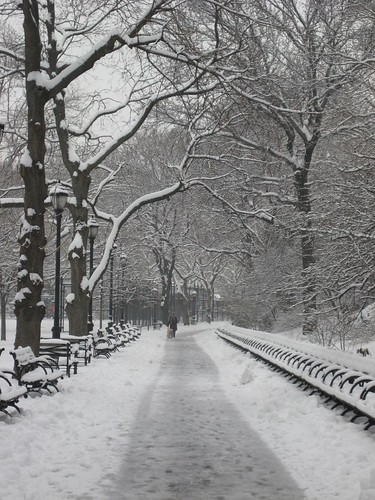
The snow shots in general printed relatively nicely; the whites read as very white in print, and the darks as very dark. This pic almost looks black and white in the print out, and I think it really works. This shot is for my mom, by the way, she loves snow shots. :)
30. Cold Pigeons:
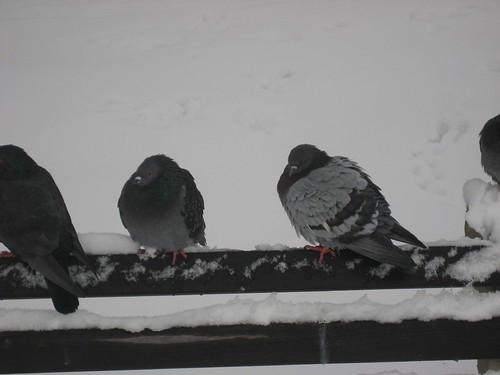
This shot printed much, much better than I thought it would. The snow, for no obvious reason, printed as very white, which really increased the contrast between the birds and the background, and the fine coloration of the pigeons (the iridescent green that they have on their necks) actually really pops, as do their eyes). I'm super happy with this one.
31. Pylons:

While in most pictures with dark detail, the printing brought the details out, in this one, it just flattened it, and the water just looks like a boring gray mass. I wouldn't print this again.
32. Snowman!: (didn't print)
33. White Flowers:

I'm not sure about thisw one. It printed pretty similar to this shot, maybe a bit yellower than on my screen, but somehow it doesn't read with pop - then again, I don't really think it had that kind of pop to begin with...in truth, this is one I'm not at all sure about. I'll print it again, if it goes over well...
34. Hand Prints:

It printed a little dark, but it works. I do think that if I were going to print it again, I would have to photoshop the light corner, it just looks weird.
35. The Loneliest Daffodil:

I've always liked this shot, but it really didn't print well. The fence looks VERY dark, and the flower looks...almost blurry. Which, now that I look at the original on my computer screen, I can see....definitely would not print again under almost any circumstances.
36. Fire-Breathing Gargoyle:

I was very curious how this one would turn out. It's gotten several positive reviews on Flickr, and I've always liked it, but on the other hand, it's always had a little bit of a "forest for the trees" problem - there's a lot going on that I think detract from it, things I couldn't help because this fellow was in a fenced in garden, I couldn't have moved some of those leaves out of my even had I wanted to. The print looks just like the original, though with better contrast - the light highlights on the gargoyle look lighter, and the darks darker, and the red pops nicely...I just am not sure. If people bought it, I would print it again. The issue isn't with the print - it's with the shot itself. :)
37. Waves on Rocks: (didn't print)
38. Looking In:

The fence printed darker, and all of the colors popped better against the white background, and I think it looks pretty good. :)
39. Pylons:

Washed out kinda badly, and lost the contrast between the dark pylons and the white of the sky that I thought made it an interesting picture. Didn't turn out terrible, but definitely not what I was looking for. Maybe with some work it'd print better.
40. Don't Panic, People!:

This printed basically the same. I just like this shot, so I'm glad it printed well. :)
41. Purple Onion Flower:

It reads as more pink purple and less blue purple on the print, and the color just isn't as rich, but despite that, it looks kind of awesome, like something a fractal program would have produced.
42. Purple Buds:

This, in print, completely lacks pop. It's all just so green, that the buds just fade into the background. I was not pleased. Another entry on the wouldn't print again list...
43. Bleeding Heart:

This shot printed looking just as cheesy as it does on my screen, though perhaps more magenta - not a bad thing, really. :)
44. Blue Flowers:

I didn't notice that it was a little blurry, but it really shows in the print. I wouldn't print this again.
45. Corn:

This printed a little more orange, but still looks good enough to eat. :) Definitely pleasing.
46. Purple-Pink Flowers: (didn't print)
47. Variegated Yuca:

Completely lacks pop - the foreground and the background just look flat. Wouldn't print again.
48. Red Hot Poker:

When I looked at the print out of this last night, I thought that it had washed out but now, looking at the original, I think it printed pretty much exactly how it looked on my screen. And that's fine. It does look a bit flat, though. :)
49. Bee on a Sunflower:
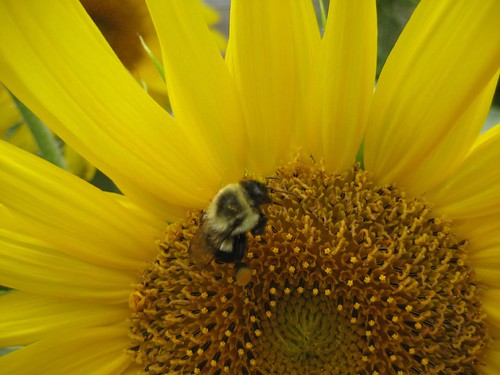
Reads as oranger, but it looks really great, the colors are wonderful. Interestingly, the flower looks more orange but the bee doesn't really, which means that the bee pops a bit better than in the original. I'm quite happy with it printed.
50. Double Rose Lotus:

While I thought this picture looked darn neat on a screen, there's something about it on print that I don't like at all. I wouldn't print this again.
51. Parodia Magnifica:

I think this one printed very nicely. The colors look very rich, and each needle is distinguishable, just how it should be. :)
52. Lotus Leaf:
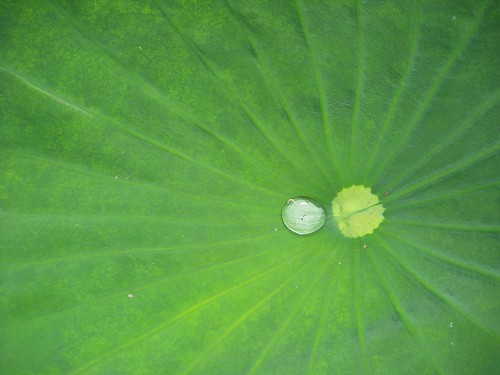
This picture? A total cliche. I know. But the printed version of it looks really beautiful, much better than it looks on my screen. The greens are much deeper, and instead of basically looking like maybe three shades of green, on the print the lights are really light and the darks are REALLY dark, and the veins stand out, and the reflection on the droplet looks really deep. I would absolutely print this again, it's on the short list of pics that looked better printed than on my computer.
53. Loads of Little Red Bugs:

This shot is an exception to my brightness rule. It actually printed with more intense shhades, and I think it looks pretty good.
54. The Stump in the Forest:

This is a photo that no one has commented on, and that makes me a little sad, because this is a shot I'm actually very proud of. This shot is one of the first times I ever found something I thought looked neat, got annoyed with my camera for not getting a picture that looked right, and then I sat there and played with settings until I got the picture I wanted. I think it really worked, and I think it printed quite nicely, so I'm pretty pleased all the way around. :)
55. (removed)
56. Phoenix:

This printed with a really nice looking texture on the bird wings. I'm pretty happy with it. I don't know why I like this pic the better because it's off center, but I do... :)
57. Church of St. Paul and St. Peter:

This printed...oddly. The first problem is that the top is cut off! On the printed version, the very top of the foreground spire isn't the shot. If any of the others have been cut off, I haven't noticed it, so it can't have mattered much, but in this one it makes a big and noticeable difference. Also, the colors just aren't as deep. I think if I were to print it again, I'd have to darken it first, cause it just printed noticeably brighter, and maybe yellower.
58. Slug: (didn't print)
59. 72nd Street:

This one printed pretty true to the original. I'm still not sure I think this shot is actually worthwhile in any way, but it did print nice.
60. Seed Pods:

This shot printed almost exactly as it appears on my screen...but I don't think I'd print it again. I don't know, it's just not saying "wow, I'm an awesome picture," to me....
61. Magnolia: (didn't print)
62. Squiggly Trees:

This printed a bit flat looking but, then, looking at the original, it is sort of flat, and I think it's okay. Also, all the colors are a bit lighter, which actually is okay - the blue lacks that richness, but the contrasting browns on the tree caused by the sunlight looks better. I just realized, too, that on some shots, the blues looked bluer than on my comp screen, and on others, it looked less
63. Shibuya:

This shot didn't print well. For example, the ask.jp sign completely washed out; the hiragana is no longer even legible; the lovely blue of the sky looks pixellated. The people in the foreground and the non-backlit parts look awesome, but who cares? I wouldn't print this again.
64. Cute Firemen:

I'm glad that![[livejournal.com profile]](https://www.dreamwidth.org/img/external/lj-userinfo.gif) nekomata voted for this image, cause if she hadn't I wouldn't have printed it, and I'm glad I did print it, because on paper my concern that the glare was too bad isn't really a big problem. It just, I don't know, works. I still might do a little work on it, but I'm no longer positive it's necessary.
nekomata voted for this image, cause if she hadn't I wouldn't have printed it, and I'm glad I did print it, because on paper my concern that the glare was too bad isn't really a big problem. It just, I don't know, works. I still might do a little work on it, but I'm no longer positive it's necessary.
65. Sunlight on Spires (Prague):

This printed decently, but like many others, it's brighter in the print, which means that the parts getting hit by the sunlight are a little washed out, and the sky looks, I don't know, lighter, less like a sunset kind of blue and more like a gray. I'm not sure how I feel about that, but I think that given the other issues, I wouldn't print this shot again.
66. The Tower of London:

This printed very nicely. The colors have pop, the sky looks nice, I just wish I hadn't taken it with that shadow across the gate tower.
67. Lightbulb Filament:

This shot is on the shortlist of ones I think printed even better than they look on screen. A definite win. The glass reflections look awesome, the filament looks like it's really glowing, I'm very pleased.
68. (removed)
69. Petals:

This one printed how it looks on screen. I'm glad at least a few did, or else I don't know how I'd EVER predict what would look good! :)
70. Central Park South by Night: (didn't print)
71. Canadian Geese Chicks:

Now, part of white I like about this picture is that it's kind of fuzzy, and the geese look like they have little furry halos. In the printed version, they just look fuzzy, and it doesn't work at all, and I would not print this pic again. I think I've learned a valuable lesson: no trying to print pics I took using digital zoom. It just fuzzes everything out too much.
72. Columbus Circle: (didn't print)
73. Stained Glass: (didn't print)
74. Dramatic Sky Over Washington:

Turned out fine. Maybe could use more contrast, but otherwise no complaints.
75. Gingerbread Girl and Snowman: (didn't print)
76. Water on a Leaf:

This didn't print well at all, and I suppose I shouldn't be surprised. This shot predates all the others on this list by over a year, when I first started taking pics and really didn't have a clue what I was doing. It's a bit blurry in the original, and the print accentuates it, and I wouldn't print it again.
77. ConEd Training Facility on the East River: (didn't print)
78. Tokyo Tower:

Given how many pics look way different, this one printed almost exactly how it looks on my screen. I wish there was more rhyme or reason to this...but I like it... :)
In all, I printed 60 shots; in my opinion, 13 of them were failures as printed images. Not a bad ratio, I guess...
Now, despite all of this, I'm going to try and sell all of these first run shots. And, heck, if some of the ones I thought didn't work actually sell before some I like better, maybe I'll even print them again - but for the most part, I think that the ones that didn't work well, I will not be printing again. Also, I'm willing to lay some of the problems I noticed squarely at the feet of the Walgreens photo printer; to really figure things out I think I'd need to get them printed again from some other place...but I'm not that serious yet. :)
I'm really, really glad I did this, because I've learned some valuable things about how this process is going to work. See, some pics I thought would look fantastic printed, just don't, and others that were very problematic on a computer screen actually turned out. In short, the pattern I noticed in this was:
1. Bright colors weren't as bright, so that the pics that really depended on brights just didn't have the pop.
2. Dark colors weren't as dark, so that the pics that I was worried would be very dark actually showed a lot of detail that wasn't visible on my computer screen (which makes me think it's time to change my screen settings...)
3. Fuzzy things looked fuzzier.
4. Things that looked like they were evenly shaded showed much more variation of color.
5. Shots that were suffused with sunlight got over-suffused with sunlight.
So I thought I'd go pic by pic on this, if only for my own information...and, of course, keep in mind that in comparison of the prints to the originals, I can only speak for how they look on the settings on my computer screens.
Note that, even though I uploaded the pics in basically the order listed here, they didn't print in that order at all, and I wrote my comments in the order the pics were in the file, so I suspect that some of my later comments are on "earlier" pictures...but it can't be helped. I tried to keep them relatively neutral in that regard, but didn't always succeed... :)
1. Thames Sunset:
I didn't think I'd printed this one, but it turns out that I did. The printed version looks a bit warmer, and the colors pop a bit better. Still, I think some of the manips would have printed better, and I didn't bother trying yet, cause I'm not quite there yet.
2. Graffiti:
I think this may be one of the only shots that printed looking pretty much exactly the way it does on the screen. :)
3. Big Ben and Parliament:
This pic has a big pro and a big con. On the pro side, it printed considerably lighter than it appears on my computer screen, the contrast looks great, the shades on the clock tower look awesome, and in that regard I'm happy. On the con, there's something kinda fuzzy about the whole thing, particularly the building itself in the left foreground. Still, I think I'd print again. Now if I only I could get Big Ben to pop like it does in the printed version while still maintaining the appearance of that awesome looming sky (which lightened also, unfortunately)
4. Sunset Over the River:
I was warned that some of the warm tones in pictures like this might not print that well, and that's basically what happened. The sky printed a lighter, and though the pinks and oranges are still definitely present, it lacks a certain pop. It's not as bad as some of the ones that really didn't work, but I'm not in love with it either. It's just...not that interesting.
5. Architecture Along the Thames:
Of the shots I printed, I think this one was the most pleasant surprise. It printed with much better contrast than on my screen, a lot of details that were indistinguishable are now visible, and I think it looks really great, especially the reflections on the windows.
6. Angel Over Prague:
On my screen, the angel is a dark blob. On the print, all the highlights of the hair and the face are actually visible, and I think that's a good thing. Some of the other colors washed out a little, which is a pity, but over all I think that it printed in a distinctly different but still really awesome way. :)
7. T.C. Masaryka Statue:
Printed pretty much exactly how it looks on the screen. Not sure that makes it worth printing - this is a shot I'm very much on the fence about - but whatever. :) That's a different question.
8. Statue Outside the Main Courtyard: (didn't print)
9. Tunnel:
This printed very nice. The contrast stayed very nice, and the lights look nice.
10. Demon Face:
Printed with better contrast. The stone wall reads really light on the print out.
11. Snow Storm:
Whatever it is about this pic that makes me like it, I like it printed, too. It looks pretty much the same. :)
12. Belvedere Castle: (didn't print)
13. Guiseppe Verde Memorial:
This looks about how I thought I would. There's something a bit flat about it in the photo, but then, that was probably unavoidable. I think that it's an interesting picture, and while my instinct is to say I wouldn't print again, if it sold, I think I might.
14. Sunset Over the Henry Hudson Parkway:
This shot really washed out on printing. Instead of a fairly definite orb for the sun, the whole sky is kinda glowy, and it lost that deeper blue of the sky around the edges. I think with some work on the file I might be able to produce a version that would look better, and it doesn't totally fail, but it's definitely in a not good category...
15. Eleanor Roosevelt Memorial:
Though it printed rather flat, I think otherwise it turned out nicely.
16. Mormon Church:
My feelings on this image printed are very divided. On the plus side, the lens smears don't show badly at all, but I should still change them. The blue shade in the pic is darker but is a lovely color, yet despite that there's something about it I don't like. I think it might be slightly fuzzy, just enough to look not right but not enough for me to be sure that's the problem. I probably wouldn't re-print this
17. Lady Bug on my Book:
Along with the Columbine, below, this pic had me very worried. It's right at the bottom of the pile, so I'd seen all the good and the bad before it, and was concerned - how would it look? Well, it looks a-ok. It's a little fuzzier around the edges than it looks in the original, but other than that, I'm glad to say it really worked. I really wish I could figure out what I was reading... :)
18. Globe at Columbus Circle:
Pinted almost exactly how it looks on my screen. Nothin' wrong with that.
19. St. Thomas Church:
This shot printed quite nicely. The contrast was improved (the whites were whiter) and the colors look warmer than they do on my screen. Definitely need to look at my settings...
20. Oops!:
The contrast is a bit better in print on this one, which is good, it helps the drawing pop from the background better.
21. Columbine:
Given how much I like this shot, I was really worried. I didn't see this photo until pretty far in to my go through of the stack last night, and I knew by then that some shots hadn't translated well. However, this is not one of them. It translated fantastic. The pinks read as very pink (without the blue undertone they have on my screen) and the white in the background printed very bright, which makes it an interesting foil to the pink and shadowed white of the flower. I'm thrilled. :)
22. Rose: (didn't print)
23. (removed)
24. (removed)
25. Jackie O Reservoir: (didn't print)
26. Snowy Lettuce Thing:
Rich colors, lots of definition around the edges, this shot printed beautifully.
27. Snow out the Window:
This shot printed a bit better than it looks in the screen, I think. The buildings read as darker, while the snow is whiter, and so is the sky, which I think makes a nice contrast. It does offer further evidence, though (see way below) that my shots got a little cropped in the printing.
28. The Intrepid at Sunset:
Though the sunset lost a little of the depth of color, and the printed version the colors look warmer than on my screen, still I'm very happy with this one, the silhouette of the ship is crisp as can be, and that's really the point, to me. :)
29. Riverside Park:
The snow shots in general printed relatively nicely; the whites read as very white in print, and the darks as very dark. This pic almost looks black and white in the print out, and I think it really works. This shot is for my mom, by the way, she loves snow shots. :)
30. Cold Pigeons:
This shot printed much, much better than I thought it would. The snow, for no obvious reason, printed as very white, which really increased the contrast between the birds and the background, and the fine coloration of the pigeons (the iridescent green that they have on their necks) actually really pops, as do their eyes). I'm super happy with this one.
31. Pylons:
While in most pictures with dark detail, the printing brought the details out, in this one, it just flattened it, and the water just looks like a boring gray mass. I wouldn't print this again.
32. Snowman!: (didn't print)
33. White Flowers:
I'm not sure about thisw one. It printed pretty similar to this shot, maybe a bit yellower than on my screen, but somehow it doesn't read with pop - then again, I don't really think it had that kind of pop to begin with...in truth, this is one I'm not at all sure about. I'll print it again, if it goes over well...
34. Hand Prints:
It printed a little dark, but it works. I do think that if I were going to print it again, I would have to photoshop the light corner, it just looks weird.
35. The Loneliest Daffodil:
I've always liked this shot, but it really didn't print well. The fence looks VERY dark, and the flower looks...almost blurry. Which, now that I look at the original on my computer screen, I can see....definitely would not print again under almost any circumstances.
36. Fire-Breathing Gargoyle:
I was very curious how this one would turn out. It's gotten several positive reviews on Flickr, and I've always liked it, but on the other hand, it's always had a little bit of a "forest for the trees" problem - there's a lot going on that I think detract from it, things I couldn't help because this fellow was in a fenced in garden, I couldn't have moved some of those leaves out of my even had I wanted to. The print looks just like the original, though with better contrast - the light highlights on the gargoyle look lighter, and the darks darker, and the red pops nicely...I just am not sure. If people bought it, I would print it again. The issue isn't with the print - it's with the shot itself. :)
37. Waves on Rocks: (didn't print)
38. Looking In:
The fence printed darker, and all of the colors popped better against the white background, and I think it looks pretty good. :)
39. Pylons:
Washed out kinda badly, and lost the contrast between the dark pylons and the white of the sky that I thought made it an interesting picture. Didn't turn out terrible, but definitely not what I was looking for. Maybe with some work it'd print better.
40. Don't Panic, People!:
This printed basically the same. I just like this shot, so I'm glad it printed well. :)
41. Purple Onion Flower:
It reads as more pink purple and less blue purple on the print, and the color just isn't as rich, but despite that, it looks kind of awesome, like something a fractal program would have produced.
42. Purple Buds:
This, in print, completely lacks pop. It's all just so green, that the buds just fade into the background. I was not pleased. Another entry on the wouldn't print again list...
43. Bleeding Heart:
This shot printed looking just as cheesy as it does on my screen, though perhaps more magenta - not a bad thing, really. :)
44. Blue Flowers:
I didn't notice that it was a little blurry, but it really shows in the print. I wouldn't print this again.
45. Corn:
This printed a little more orange, but still looks good enough to eat. :) Definitely pleasing.
46. Purple-Pink Flowers: (didn't print)
47. Variegated Yuca:
Completely lacks pop - the foreground and the background just look flat. Wouldn't print again.
48. Red Hot Poker:
When I looked at the print out of this last night, I thought that it had washed out but now, looking at the original, I think it printed pretty much exactly how it looked on my screen. And that's fine. It does look a bit flat, though. :)
49. Bee on a Sunflower:
Reads as oranger, but it looks really great, the colors are wonderful. Interestingly, the flower looks more orange but the bee doesn't really, which means that the bee pops a bit better than in the original. I'm quite happy with it printed.
50. Double Rose Lotus:
While I thought this picture looked darn neat on a screen, there's something about it on print that I don't like at all. I wouldn't print this again.
51. Parodia Magnifica:
I think this one printed very nicely. The colors look very rich, and each needle is distinguishable, just how it should be. :)
52. Lotus Leaf:
This picture? A total cliche. I know. But the printed version of it looks really beautiful, much better than it looks on my screen. The greens are much deeper, and instead of basically looking like maybe three shades of green, on the print the lights are really light and the darks are REALLY dark, and the veins stand out, and the reflection on the droplet looks really deep. I would absolutely print this again, it's on the short list of pics that looked better printed than on my computer.
53. Loads of Little Red Bugs:
This shot is an exception to my brightness rule. It actually printed with more intense shhades, and I think it looks pretty good.
54. The Stump in the Forest:
This is a photo that no one has commented on, and that makes me a little sad, because this is a shot I'm actually very proud of. This shot is one of the first times I ever found something I thought looked neat, got annoyed with my camera for not getting a picture that looked right, and then I sat there and played with settings until I got the picture I wanted. I think it really worked, and I think it printed quite nicely, so I'm pretty pleased all the way around. :)
55. (removed)
56. Phoenix:
This printed with a really nice looking texture on the bird wings. I'm pretty happy with it. I don't know why I like this pic the better because it's off center, but I do... :)
57. Church of St. Paul and St. Peter:
This printed...oddly. The first problem is that the top is cut off! On the printed version, the very top of the foreground spire isn't the shot. If any of the others have been cut off, I haven't noticed it, so it can't have mattered much, but in this one it makes a big and noticeable difference. Also, the colors just aren't as deep. I think if I were to print it again, I'd have to darken it first, cause it just printed noticeably brighter, and maybe yellower.
58. Slug: (didn't print)
59. 72nd Street:
This one printed pretty true to the original. I'm still not sure I think this shot is actually worthwhile in any way, but it did print nice.
60. Seed Pods:
This shot printed almost exactly as it appears on my screen...but I don't think I'd print it again. I don't know, it's just not saying "wow, I'm an awesome picture," to me....
61. Magnolia: (didn't print)
62. Squiggly Trees:
This printed a bit flat looking but, then, looking at the original, it is sort of flat, and I think it's okay. Also, all the colors are a bit lighter, which actually is okay - the blue lacks that richness, but the contrasting browns on the tree caused by the sunlight looks better. I just realized, too, that on some shots, the blues looked bluer than on my comp screen, and on others, it looked less
63. Shibuya:
This shot didn't print well. For example, the ask.jp sign completely washed out; the hiragana is no longer even legible; the lovely blue of the sky looks pixellated. The people in the foreground and the non-backlit parts look awesome, but who cares? I wouldn't print this again.
64. Cute Firemen:
I'm glad that
nekomata voted for this image, cause if she hadn't I wouldn't have printed it, and I'm glad I did print it, because on paper my concern that the glare was too bad isn't really a big problem. It just, I don't know, works. I still might do a little work on it, but I'm no longer positive it's necessary.65. Sunlight on Spires (Prague):
This printed decently, but like many others, it's brighter in the print, which means that the parts getting hit by the sunlight are a little washed out, and the sky looks, I don't know, lighter, less like a sunset kind of blue and more like a gray. I'm not sure how I feel about that, but I think that given the other issues, I wouldn't print this shot again.
66. The Tower of London:
This printed very nicely. The colors have pop, the sky looks nice, I just wish I hadn't taken it with that shadow across the gate tower.
67. Lightbulb Filament:
This shot is on the shortlist of ones I think printed even better than they look on screen. A definite win. The glass reflections look awesome, the filament looks like it's really glowing, I'm very pleased.
68. (removed)
69. Petals:
This one printed how it looks on screen. I'm glad at least a few did, or else I don't know how I'd EVER predict what would look good! :)
70. Central Park South by Night: (didn't print)
71. Canadian Geese Chicks:
Now, part of white I like about this picture is that it's kind of fuzzy, and the geese look like they have little furry halos. In the printed version, they just look fuzzy, and it doesn't work at all, and I would not print this pic again. I think I've learned a valuable lesson: no trying to print pics I took using digital zoom. It just fuzzes everything out too much.
72. Columbus Circle: (didn't print)
73. Stained Glass: (didn't print)
74. Dramatic Sky Over Washington:
Turned out fine. Maybe could use more contrast, but otherwise no complaints.
75. Gingerbread Girl and Snowman: (didn't print)
76. Water on a Leaf:
This didn't print well at all, and I suppose I shouldn't be surprised. This shot predates all the others on this list by over a year, when I first started taking pics and really didn't have a clue what I was doing. It's a bit blurry in the original, and the print accentuates it, and I wouldn't print it again.
77. ConEd Training Facility on the East River: (didn't print)
78. Tokyo Tower:
Given how many pics look way different, this one printed almost exactly how it looks on my screen. I wish there was more rhyme or reason to this...but I like it... :)
In all, I printed 60 shots; in my opinion, 13 of them were failures as printed images. Not a bad ratio, I guess...
Now, despite all of this, I'm going to try and sell all of these first run shots. And, heck, if some of the ones I thought didn't work actually sell before some I like better, maybe I'll even print them again - but for the most part, I think that the ones that didn't work well, I will not be printing again. Also, I'm willing to lay some of the problems I noticed squarely at the feet of the Walgreens photo printer; to really figure things out I think I'd need to get them printed again from some other place...but I'm not that serious yet. :)


![[identity profile]](https://www.dreamwidth.org/img/silk/identity/openid.png)
no subject
Date: 2010-01-22 10:23 pm (UTC)no subject
Date: 2010-01-25 04:53 pm (UTC)33 turned out kinda flat, but I think it might still works. I included the majority of the botanicals because of your suggestion before. :)